
Download Intellinode – AI‑Powered Content Creation Tool for Marketers & Creators
Overview
Intellinode is a cloud‑based AI writing assistant that brings together the most advanced language models from OpenAI and Google under a single, easy‑to‑use interface. Designed specifically for content creators, digital marketers, and e‑commerce teams, the platform helps you generate high‑quality text, images, and even full‑website layouts with just a few clicks. Whether you need a blog post, product description, social‑media ad copy, or a visual concept, Intellinode’s prompt‑driven workflow turns a simple idea into polished output in seconds.
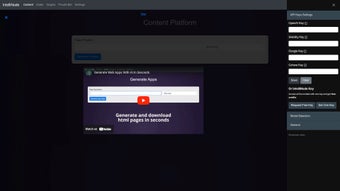
The service operates through a clean settings panel where you can paste your own API keys or rely on the universal Intelli Node Key that grants instant access to every integrated model. A short showcase video on the homepage walks new users through the main capabilities, highlighting how the dual‑model approach can outperform single‑engine solutions. Although still in active development, Intellinode already demonstrates a robust feature set, a responsive web UI, and a commitment to secure, privacy‑first data handling—making it a compelling choice for anyone looking to streamline content production without sacrificing quality.
Key Features of Intellinode
- Dual‑Model Engine: Seamlessly combines OpenAI’s GPT‑4 and Google’s Gemini models, offering a broader creative range and higher accuracy.
- Multimodal Output: Generate not only text but also AI‑crafted images and complete website mock‑ups from a single prompt.
- Universal Intelli Node Key: One‑click activation of all models without the need to manage multiple API credentials.
- Prompt Library: Pre‑built templates for blog outlines, product descriptions, ad copy, and SEO‑focused snippets.
- Real‑time Collaboration: Share generated drafts instantly with teammates via a unique share link, enabling quick feedback loops.
- Version History: Automatic saving of each iteration, allowing you to revert to previous versions or compare alternatives.
- Secure Data Handling: End‑to‑end encryption for all user inputs and generated assets, complying with GDPR and CCPA standards.
- Scalable Pricing: Free tier with generous token limits, plus paid plans that unlock higher throughput and priority support.
- Integration Ready: Webhooks and Zapier connectors let you push content directly into WordPress, Shopify, or HubSpot.
- Interactive Showcase Video: A short walkthrough demonstrates how to set up prompts, adjust model parameters, and export results.
Installation & Usage Guide
Getting started with Intellinode is intentionally straightforward because the platform lives entirely in the browser—no download or local installation is required. Follow these steps to launch the tool and begin creating:
- Visit the Official Site: Open intellinode.com on any modern browser (Chrome, Edge, Firefox, or Safari).
- Create an Account: Click “Sign Up,” enter your email, and verify the confirmation link. You can also log in with Google or Microsoft for faster access.
- Access the Settings Panel: After logging in, locate the gear icon in the top‑right corner. Here you’ll find the “API Keys” tab.
- Enter API Keys (Optional): If you prefer to use your own OpenAI or Google credentials, paste them into the respective fields. Otherwise, toggle the “Use Universal Intelli Node Key” option to activate the built‑in models.
- Choose a Prompt Template: From the dashboard, select a template that matches your content type—e.g., “Blog Post Outline” or “Product Description.”
- Customize Your Prompt: Add your specific keywords, tone preferences, word count, or any other constraints. The AI will respect these parameters when generating output.
- Generate Content: Click the “Create” button. Within a few seconds, Intellinode will display the generated text, a preview image (if applicable), and a downloadable HTML snippet for web layouts.
- Iterate & Refine: Use the “Regenerate” or “Edit Prompt” options to tweak the result. Each iteration is saved automatically, so you can compare versions side‑by‑side.
- Export & Share: Download the content as a .txt, .md, or .html file, or copy the shareable link to collaborate with teammates.
- Upgrade (If Needed): If you hit the free tier limits, the “Upgrade” button in the sidebar will guide you through the subscription process.
Because Intellinode runs on the cloud, updates are applied instantly—no manual patching or version checks are required. The platform also offers a live chat support widget for real‑time assistance, ensuring you stay productive even if you encounter a hiccup.
Conclusion: Compatibility, Pros & Cons, FAQ & Next Steps
Compatibility
Intellinode is a web‑native solution, which means it works on any device that can run a modern browser. Supported operating systems include Windows 10/11, macOS Monterey and later, Linux distributions with Chrome/Firefox, as well as mobile platforms such as Android 8.0+ and iOS 13+. Because all processing happens on remote servers, there are no heavy local CPU or GPU requirements—making it an ideal choice for freelancers on a laptop, agencies on shared workstations, or teams using tablets in the field.
Pros & Cons
- Pros
- Access to two leading AI models in a single interface.
- Generates text, images, and website layouts without additional plugins.
- Free tier generous enough for occasional use.
- Secure, GDPR‑compliant data handling.
- Easy collaboration via shareable links and version history.
- Cons
- Internet connection required; offline use is not possible.
- Advanced customization (e.g., fine‑tuning models) is limited to higher‑tier plans.
- Performance may vary during peak usage times on the free tier.
- Currently no native desktop or mobile app—reliant on browser UI.
Frequently Asked Questions
Is Intellinode really free to use?
Yes, Intellinode offers a free tier that includes a substantial number of generation tokens each month, enough for most small‑scale projects. Paid plans unlock higher limits and priority model access.
Do I need my own OpenAI or Google API keys?
No. While you can paste your own keys for personal quota control, Intellinode provides a universal Intelli Node Key that grants immediate access to both models without extra setup.
Can I generate images as well as text?
Absolutely. By selecting an “Image Generation” template, the platform uses the integrated Google Gemini vision model to produce custom graphics based on your description.
Is my data safe when I use Intellinode?
Intellinode employs end‑to‑end encryption for all inputs and outputs, and it does not store content longer than necessary for processing. The service complies with GDPR and CCPA regulations.
How quickly can I start creating content after signing up?
You can begin generating content within minutes—just create an account, choose the universal key, pick a prompt template, and click “Create.” No software download or configuration is required.
Final Thoughts & Call to Action
Intellinode bridges the gap between powerful AI models and everyday content workflows, delivering a versatile, secure, and user‑friendly solution for anyone who needs high‑quality copy, visuals, or web layouts on a tight schedule. Its dual‑engine architecture, combined with a generous free tier and robust collaboration tools, makes it a standout option in the crowded AI‑writing market. If you’re ready to accelerate your content pipeline, reduce writer’s block, and produce professional‑grade assets without a steep learning curve, sign up for Intellinode today and experience the future of AI‑powered creation.






